Most of the time, when you want to root an Android devices, you may
think you have to start your computer, and in many cases, it has to be a
PC running Windows, which can be a real pain. Google does not allow
apps that provide root access in Google Play, and all you can install
are apps that can check whether your device is rooted such as Root
Checker. For some reasons, today I needed to root my smartphone (ThL
W200, Mediatek MT6589T), and I looked for a method working with Linux,
and I did not find any, but I came across Framaroot, an Android app,
that allows you to do that within your Android device without external
hardware required.
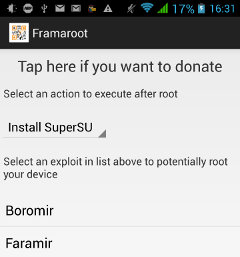 Framaroot
is very easy to use and support different exploit in order to provide
root access to many devices based on Mediatek (Boromir or Faramir
exploits), Qualcomm (Gandalf exploit), Samsung Exynos (mutiple
exploits), as well a few devices based on HiSilicon K3V2, AMLogic, and
Texas Instruments OMAP3. The full list of devices and the latest version
of framaroot are available on XDA Developers Forum.
Framaroot
is very easy to use and support different exploit in order to provide
root access to many devices based on Mediatek (Boromir or Faramir
exploits), Qualcomm (Gandalf exploit), Samsung Exynos (mutiple
exploits), as well a few devices based on HiSilicon K3V2, AMLogic, and
Texas Instruments OMAP3. The full list of devices and the latest version
of framaroot are available on XDA Developers Forum.
Here’s what I had to do to root my Mediatek based phone:
If you prefer more visual instructions watch the video below, but do not download the apk via bit.ly/easyrooting as it points to an older version.
Framaroot
is very easy to use and support different exploit in order to provide
root access to many devices based on Mediatek (Boromir or Faramir
exploits), Qualcomm (Gandalf exploit), Samsung Exynos (mutiple
exploits), as well a few devices based on HiSilicon K3V2, AMLogic, and
Texas Instruments OMAP3. The full list of devices and the latest version
of framaroot are available on XDA Developers Forum.Here’s what I had to do to root my Mediatek based phone:
- Install Root Checker to verify my device is not already rooted.
- Go to System settings->Security to make sure “Unknown Sources” is checked.
- Open my phone web browser, and download framaroot 1.8.1. Link: http://bit.ly/1g5GGs0
- Install and run framaroot
- Tap on “Faramir” to install SuperSU
- Verify my device is rooted with Root Checker —> Success!
If you prefer more visual instructions watch the video below, but do not download the apk via bit.ly/easyrooting as it points to an older version.

No comments:
Post a Comment